Coming to iPhone and Android · Built for window and door manufacturers, dealers, sales force and installation crews

One mistake pays for it.

Manufacturer-ready measure sheets from every job site.

A field measuring app built around your exact window and door specs — with automatic brickmold to frame size conversion in 1/16" fractions, jobsite pre photos on every opening, and one-tap branded measure sheets that include those photos in the email.

  • Jobsite pre photos on the emailed measure sheet
  • Auto brickmold → frame size in 1/16"
  • Manufacturer colours + dealer logo
  • Multiple manufacturer brands in one app
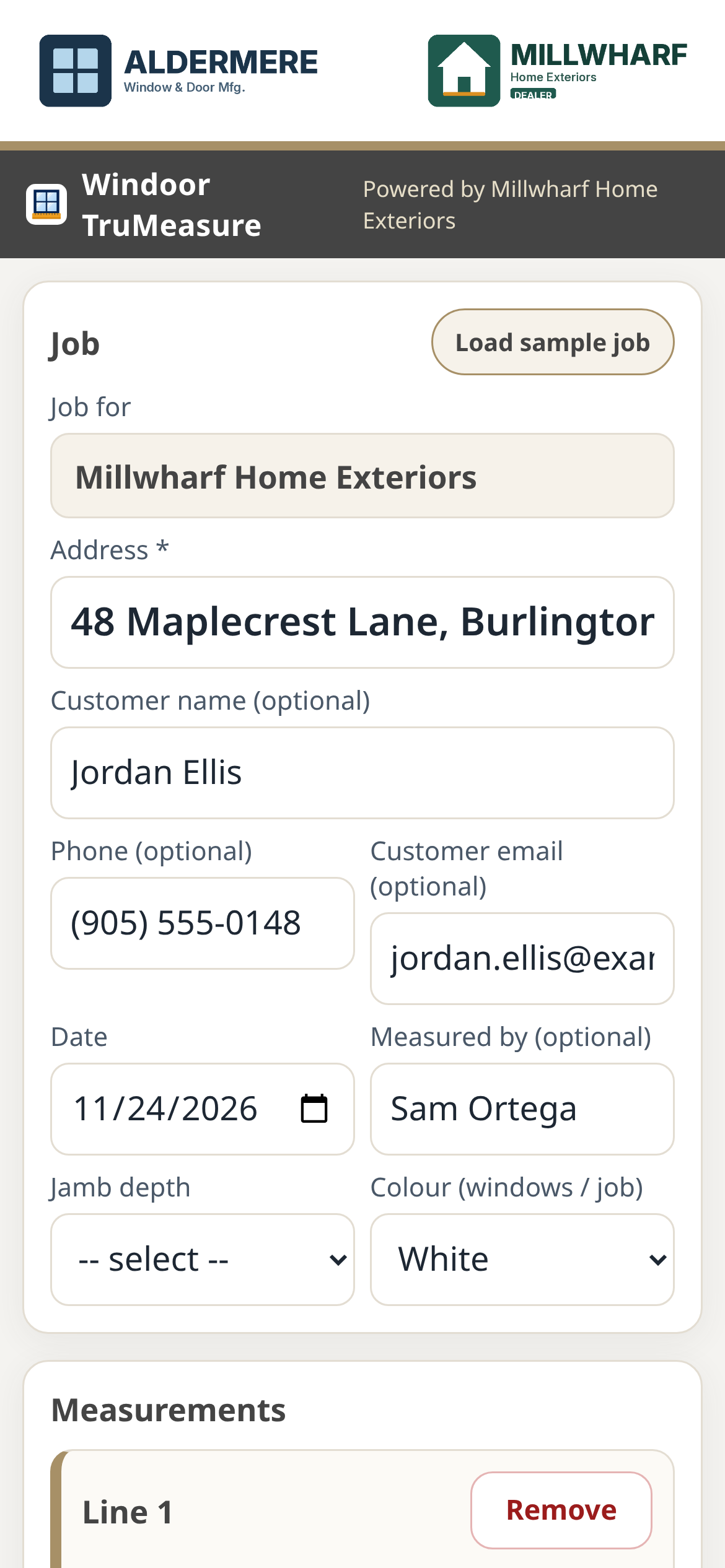
Windoor TruMeasure iPhone app screen demo showing job details and opening measurements
iPhone · App screen demo
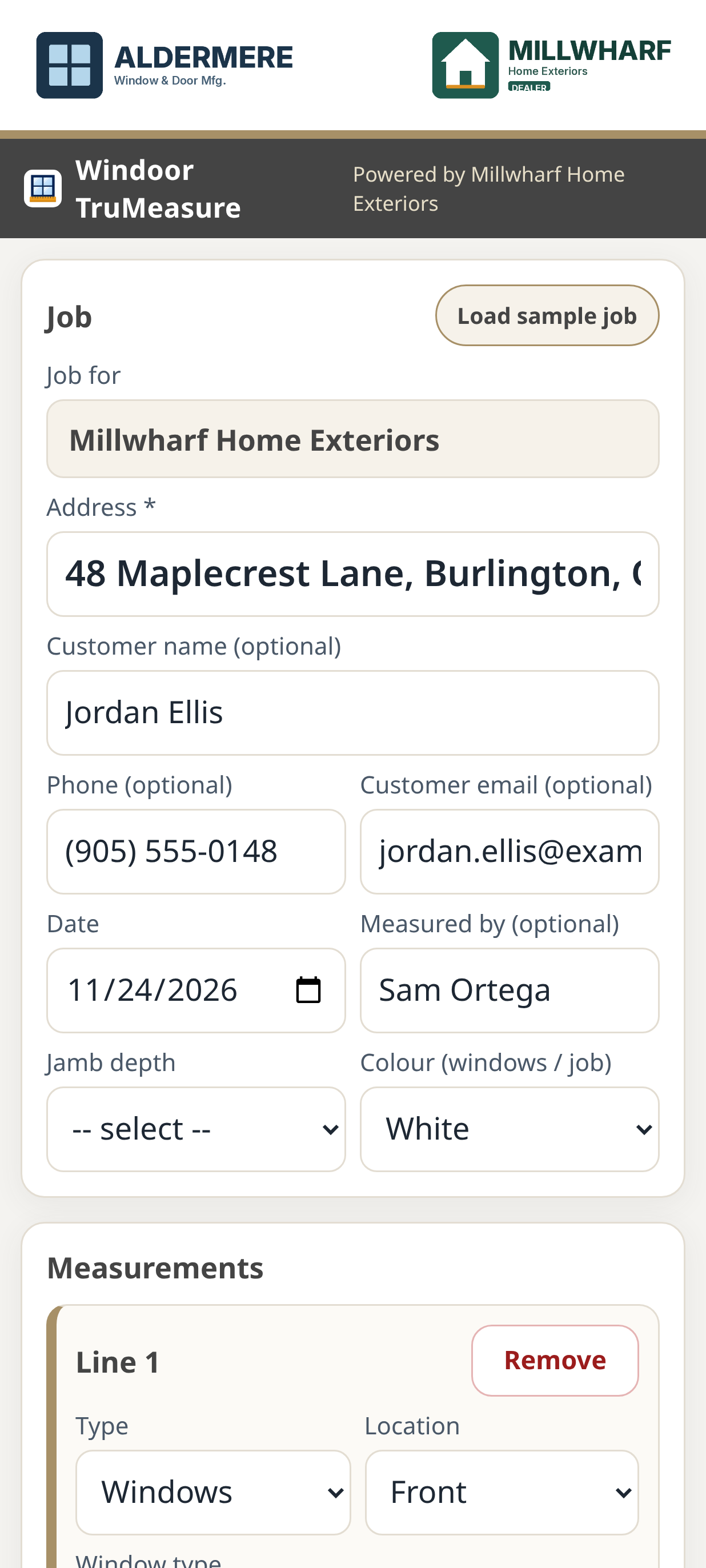
Windoor TruMeasure Android app screen demo showing line item measurement inputs
Android · App screen demo

App screen demos shown above are configured for a sample manufacturer and dealer pairing.

Jobsite pre photos

Take photos in the app for a clear look at the job before you quote — and they go out on the measure sheet email.

While measuring, snap photos of each opening right in the app. They're tied to that opening's sizes and shown on the emailed measure sheet, so the inputter gets a clear look at the job before quoting.

  • A clear look before quoting See the opening, the trim and the surrounding wall on the sheet instead of working from memory or notes.
  • Photos right on the emailed sheet Every photo appears next to the opening it belongs to, beside the width and height.
  • Taken in the app No separate camera roll or text thread to sort through afterwards.
1

Window · Front living room

Casement · PVC (vinyl)

Qty 1
Brickmold size
59" W × 47 1/2" H
Frame size
54 7/8" W × 44 9/16" H

On the emailed sheet

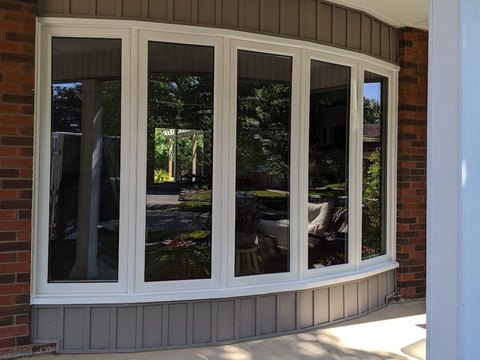
Exterior jobsite pre photo of a window in brick, with porch access
Exterior
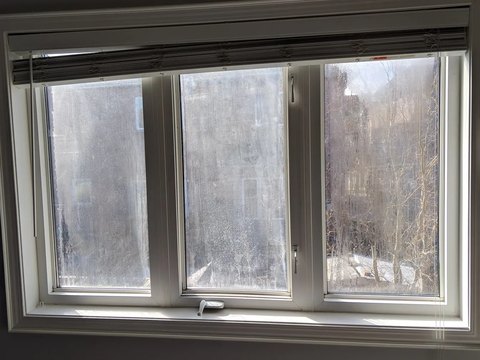
Interior jobsite pre photo of a fogged three-panel casement window
Interior
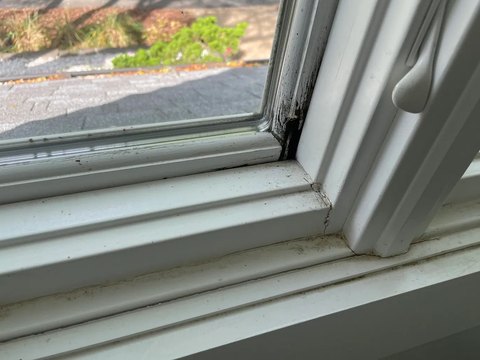
Close-up jobsite pre photo of a mould-stained window sill and frame corner
Sill

Details Jamb 6 9/16" · Ext: White · Int: White

Sample opening card. Real jobsite pre photos appear next to each opening's width and height on the measure sheet email.
Workflow

Measure, Input, Send — finished before you leave the driveway.

Built for window and door manufacturers, dealers, sales force and installation crews working off a phone on site. Every step matches how jobs are measured and quoted.

01

Measure

Select windows, entry doors, patio doors, thermal glass, or bay/bow. Pick exact widths and heights in 1/16" fractions, choose jamb depth and options from your manufacturer's line, and capture jobsite pre photos of the brick, trim, sill and access for each opening.
02

Input

Every manufacturer option is available in dropdown form, from brickmold and jamb size to window or door series and even glass type, all customizable to your business. The app can hold multiple manufacturer brands at once, so a dealer can measure for several brands in the same app.

03

Send

Tap once to email a clean, colour-coordinated measure sheet carrying both the manufacturer's and dealer's logos, every opening spec, install notes, and the in-app jobsite pre photos shown on that same email, tied to each opening, straight to quoting.

Core Advantage

Built around your specs, not a generic notepad.

Every manufacturer option is available in dropdown form, from brickmold and jamb size to window or door series and even glass type, all customizable to your business. The app can hold multiple manufacturer brands at once, so a dealer can measure for several brands in the same app.

Brickmold to frame conversion

Pre-loaded with your manufacturer's brickmold offerings. Dealers enter the brickmold opening in 1/16" fractions and the frame size calculates automatically.

Window lines & bay/bow

Configured for your window series, operating configurations, sills, and multi-section bay and bow units with centre, flanker, and seat board specs.

Steel & fiberglass door lines

Captures slab size, swing, handing, jamb depth, sill type, rectangular or arch transoms, and split exterior/interior colours for your door catalogue.

Patio door lines

Supports your panel counts, standard widths and heights, operating configurations (such as OX, XO, or OR), brickmold profiles, and jamb options.

Thermal glass & jamb depths

Exact 1/16" sealed unit dimensions, Low-E coatings, overall thickness, spacer type, frosted options, plus your full list of standard and custom jamb depths.

Opening photos & one-tap email

Snap jobsite pre photos tied directly to each opening so the inputter gets a clear look at the job before quoting, then send the branded measure sheet in one tap, with those photos shown on the email. An open comment section on every field lets the measurer note anything out of the ordinary.

Two Sides, One Standard

Built for manufacturers. Ready for every dealer on the road.

Keep specs consistent across your dealer network while giving field teams a fast tool they actually want to use.

For Manufacturers

Your brand, your deductions, cleaner orders

Stop decoding handwritten notes and chasing missing jamb depths before a job can enter quoting.

  • Colour-coordinated to your brand: Your brand colours and manufacturer logo lead both the app and the measure sheet.
  • Locked to your product specs: Brickmold profiles, jamb depths, window series, door lines, patio doors, and thermal glass match what you sell.
  • Automatic frame conversion: Your brickmold to frame size rules run automatically so orders arrive with consistent deductions.
  • Structured quote requests: Every emailed sheet lands with clear line items, notes, and opening photos ready to price.
For Dealers, Installers & Salespeople

Your logo on the sheet. Zero job-site guesswork.

Measure fast on iPhone or Android and hand off a polished, co-branded sheet straight from the site.

  • Upload your own dealer logo: Your company logo appears right alongside the manufacturer's on the app header and emailed measure sheet.
  • 1/16" fraction pickers: Tap whole inches and fractions quickly on site without squinting at paper pads or calculating frame sizes by hand.
  • Photos attached per opening: Snap photos of each opening in the app for a clear look at the job before quoting. Those same photos appear on the emailed measure sheet.
  • One-tap measure sheet email: Send the complete job summary from the driveway in seconds — no retyping back at the office.
  • An open comment section on every field: The measurer can note anything out of the ordinary right on that line.
  • Multiple brands at one time: The app can hold multiple manufacturer brands at once, so a dealer can measure for several brands in the same app.
The Output

A measure sheet built for how windows and doors are actually ordered.

Every job turns into one clean, readable email summary — formatted in the manufacturer's brand colours, co-branded with the dealer's logo, and carrying the in-app jobsite pre photos right on the emailed sheet.

  • Complete job header Customer details, job address, date measured, dealer identity, and who measured the site.
  • Numbered opening blocks Each window, entry door, thermal glass unit, patio door, and bay/bow sits in its own numbered card with quantity and series.
  • Brickmold & frame sizes side by side Shows the measured brickmold size in 1/16" fractions alongside the converted frame size and deduction profile used.
  • Jobsite pre photos on the emailed sheet The photos taken in the app during the measure appear on the measure sheet email, beside each opening's width and height, so the inputter gets a clear look at the job before quoting.
  • Full specs & notes Lists handing, swing, slab size, jamb depth, exterior/interior colours, glass makeup, and field notes for every opening.
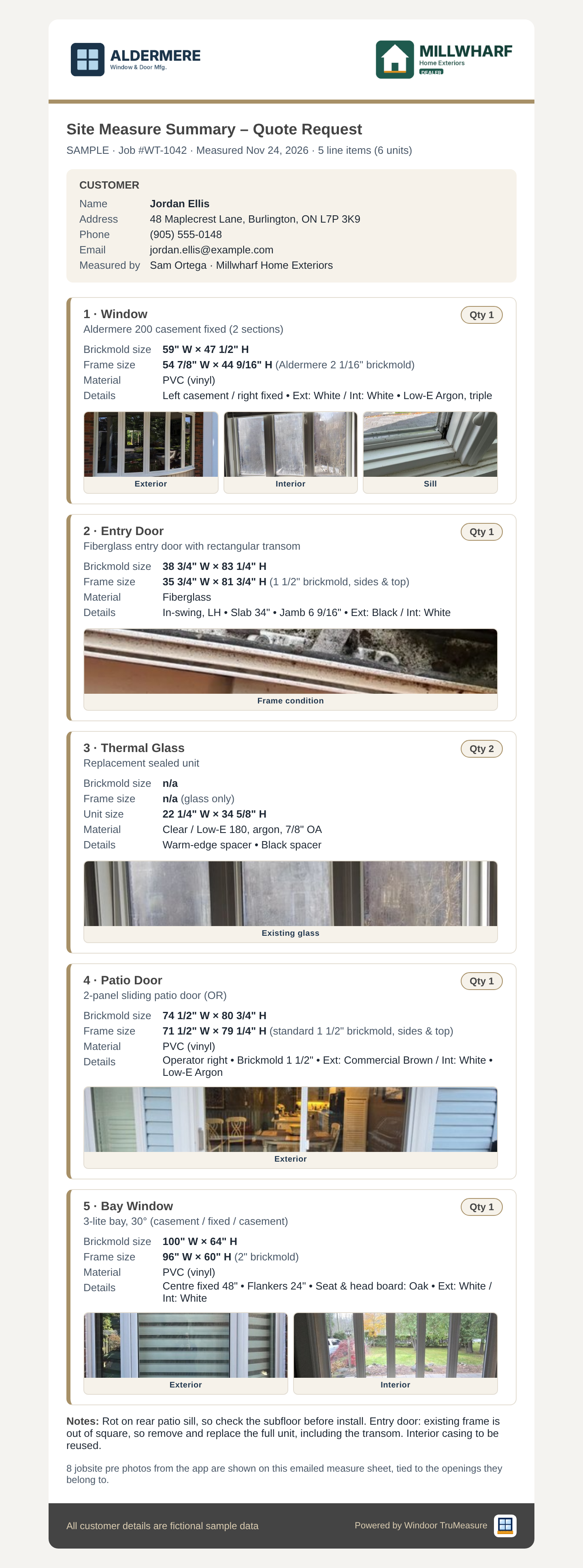
Sample emailed measure sheet (demo render showing dual manufacturer & dealer branding and fictional customer data).
Expandable on request

Our customization list is a starting point, not a limit.

Windows, steel and fiberglass entry doors, patio doors, thermal glass, and bay/bow units are just the baseline. Need custom grille patterns, casing deductions, transom profiles, hardware finishes, colour palettes, or specialized product lines? Tell us how your team measures and we add it to your build.

FAQ

Common questions

How is Windoor TruMeasure customized for a manufacturer?

Each manufacturer setup is tailored to your brand colours, logo, brickmold profiles, automatic brickmold to frame deductions, jamb depths, window series, steel and fiberglass door lines, patio door configurations, and thermal glass options.

Do the in-app jobsite photos appear on the measure sheet email?

Yes. Photos captured in the app during the measure are tied to that opening and shown on the emailed measure sheet, next to its width and height, so the inputter gets a clear look at the job before quoting.

Can dealers put their own branding on the measure sheet?

Yes. Dealers upload their own logo, which appears beside the manufacturer's logo at the top of the app and on every emailed measure sheet.

Is the app live on the Apple App Store or Google Play?

Not yet — Windoor TruMeasure is built as a Progressive Web App (PWA) and is coming to iPhone and Android. Book a demo to preview how it runs on both platforms.

How does brickmold to frame size conversion work?

In the field, the measurer enters the brickmold opening to 1/16" fractions and selects the manufacturer's brickmold profile. The app automatically applies your deduction rules to output the frame size on the measure sheet.

Can a dealer measure for more than one manufacturer?

Yes. The app can hold multiple manufacturer brands at once, so a dealer can measure for several brands in the same app.

Can the measurer add notes on a field?

Yes. There is an open comment section on every field, so the measurer can note anything out of the ordinary.

What if our product line needs extra options or custom line items?

The standard customization list is a starting point, not a limit. Additional line items, field inputs, glass packages, and deduction formulas can be added on request.

See Windoor TruMeasure built around your product line.

Book a walkthrough to see how your brickmold rules, brand colours, and dealer-branded measure sheets work together on iPhone and Android.

Coming to iPhone and Android · [email protected]